Showing posts with label Technology in the Classroom. Show all posts

Sunday, March 6, 2011

New Winner of the Smart Lesson Stop Giveaway!!!

Unfortunately, the winner never contacted me for the Smart Lesson Stop Giveaway.  So...
The new winner is.....


So, Amy Lynch, please contact me within 48 hours, or I will have to choose someone else!  
Email me at kwalsky@gmail.com.  


Photobucket

Monday, February 28, 2011

First Grade and Kindergarten Smartboard Lessons Giveaway!

I love my Smartboard, but I didn't LOVE it until recently.  
I didn't use it the way I needed to.  I can admit it now.  I used it with my Elmo, I used it for PowerPoints, and I used it as a glorified computer monitor and overhead. 
I didn't LOVE it, and use it the way it wanted so badly to be used.  I am so sorry little Smartboard for the time we could have spent together.  I know now you were just dying to be engaged with my students. Wanting so badly to be touched with the pen, and interactive with those little minds.
 I think I heard you reboot a few times over it.
But...I DO NOW!!!!

Enter the.....

I love them!  They have saved my entire Calendar Time!  I no longer take up half the room with my calendar wall!!!!  I can actually display child centered work!  I can have room to put anchor charts!  I absolutely think these girls are the most up and coming gals in the teacher world!
Just look at Calendar Time on a Smartboard:
It is interactive to actually keep track of the weather.  On the next page, you keep a running temperature graph that is interactive and connected to Weather.com


Money keeps track of the days we have been in school!


Number grid can be used a variety of ways.  The next page that isn't shown is a fact family house where we roll die, yes, interactive Smartboard die to determine our fact family house!

I cannot tell you how awesome these programs are!  If you use Everyday Math it goes over the same skills!

I also love the games they created.  Our classroom favorite is probably:
Long Vowel Speedway!
The kids can't get enough of this game and all that are included.  I believe there are at least 8 different games in the Long Vowel Speedway file.  Kids love this during Daily 5.  I include it in Working on Words.

Enough of how much I love Smart Lesson Stop!  Now I get to tell you how you can love them!!!!

Go to their site, look around, and then come back here and just leave a comment about what you think would be of good use to you in your classroom. (1 Entry)

Follow me (1 Entry)

And the WINNER WILL GET..... 4 Smartboard Products of their choice!!!!

YES, I SAID 4!!!!!  WHOOO HOOO!

I will announce a winner on Friday, March 4th at 7:00ish EST

I just know you guys are going to love their stuff.  I only like the best things out there and items that I just can't make myself, or don't have the time.  I LOVE their resources, the kids LOVE them, and it saves time!  Not to mention that their products are so teacher friendly priced!  

Let the Smartie's Smartboard Contest Begin!

Photobucket

Thursday, February 24, 2011

iPods in the Classroom

One of the best things that I ever did was ask my principal, well beg my principal, for iPod touches.  I got 5 for my very own classroom.  Then I went, no ran, to the Dollar Tree and bought protectors for the bunch.  :)

I love the games and apps that are available for teachers to use with their kids.  I use these iPods daily in my Daily 5 rotations.  I use them for work on words, listen to reading, and writing.  Here are the apps that I use for Reading:


Here are the apps I use for math:

Little tip:  arrange the apps to use for Reading on the first page, and math on the next.  I moved all those non-student friendly apps to the last page and then put them in their own folder.  Kids don't even try to use them at all.  I also took everything off the dock at the bottom.  This is very easy to do in iTunes.

I use the voice recorder to have kids make math sentences to solve for their partner.  They record a problem and their partner solves it on paper.  They also create story problems orally which are fun to see them write down.  Students also use the apps for math games during math center rotations.

 I also have them record themselves reading during Read to Self.  They like to hear themselves read and they also critique themselves for accuracy, fluency, and expression.

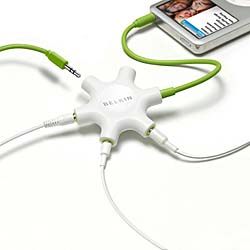
I also record myself in QuickTime reading books and other faculty and staff in the school reading books to guess the reader.  I love this little mechanism for a Listen to Reading Center:
How cool is the Rockstar by Belkin (buy it through Amazon.  It is the cheapest)?  A little iPod Listening Center!
I recorded all the Scott Foresman CD's for Listen to Background Songs into iTunes, typed out the words and put them together in a book for a listen to reading center.  No CD's to loose, not scratches, and super easy!

Here is a fantastic site for more ideas on how to use the iPod in the classroom.  I seriously don't know what I did without them.  Engagement has increased, time on task rocks, and each student is getting a little personal tutor.

I looked around today during Daily 5 and just smiled!  I had kids on iPods, kids on the Smartboard, kids on computers listening to reading, and kids making video's using the Flip Camera of the plays they had written, and kids just reading books.  

I love how much fun teaching has become.  Who would have thought the classroom would become this???  I remember in 6th grade, our class got our first Atari Computer.  It was brown and huge, and none of us knew what to do. My teacher cried at her desk and said in 10 years, no one would need teachers (Chuckle). It took about an hour to write a billion(maybe not that much) code to get a balloon to float across the screen.  I remember in college being "high tech" with my Brother Word Processor that weighed a ton in my sorority house and all the other girls were in admiration.  I can't wait to see what it will be like in 10 more years!!!!


Photobucket